Moovy AI · Chatbot inside DataHub

Ask your fleet in plain English

Moovy does the work you’d do in a dashboard, without the clicking around. Ask about trips, scores, and who drove what — and get an answer on the spot. You stay in DataHub, where you already work.

What you can ask

Skip hunting screens for a number you could ask out loud.

Ask things like:

How many trips did we complete last month?

Compare safety scores this week vs last week.

Who drove what — by driver, day, or vehicle type?

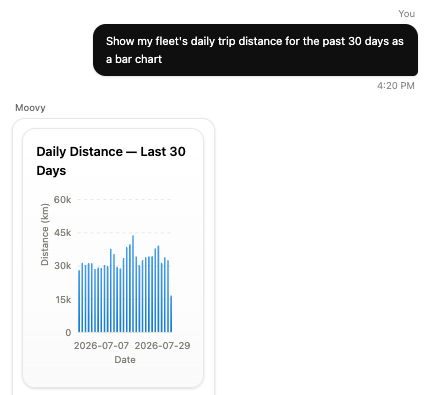
Show that as a chart or a table.

Find a user by name, email, or client ID.

Which vehicle type logged the most trips this month?

Whose safety scores dropped since last month?

How many new users joined this week?

Analytics cover trips, users, administrators, and vehicle types.

Where it lives

Moovy is one assistant inside DataHub — not a second console, not a public chatbot.

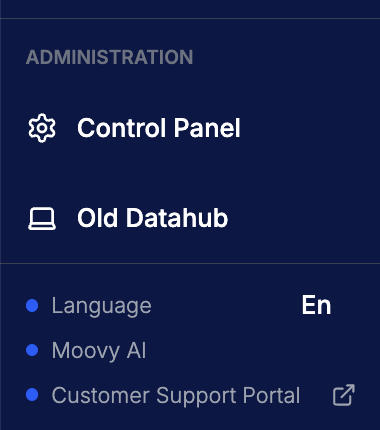
Open it from the DataHub side menu. Moovy AI opens in a chat panel over the screen you’re on, so you can ask a question without losing your place.

From question to chart

Start with a plain question. Keep asking until the answer has the shape you need.

How a conversation goes

Frequently Asked Questions

No. It is an assistant inside DataHub for authorized users. It answers from company-scoped telematics data — the companies and records you are allowed to see.

No. Moovy gets you to an answer fast. The screens still hold the detail: trip replays, driver profiles and settings. Ask Moovy to find a driver, then open their profile in DataHub.

Open DataHub and sign in. Moovy AI is available there. There’s no separate install and no support ticket to switch it on.

Ready to ask the dashboard instead of hunting it?

Moovy AI lives in DataHub — company-scoped answers in plain English.